 Gravity

01 / A TIMELY NUDGE
Before “free” becomes a fee.
Track free-trial end dates and get a reminder before a service starts charging.
Stay ahead of trialsLESS WASTE. MORE SPACE.
Subscriptions add up. Gravity helps you track what you pay, catch upcoming renewals, and cancel what you no longer need.
Paid app · $19.99/mo or $59.99/yr
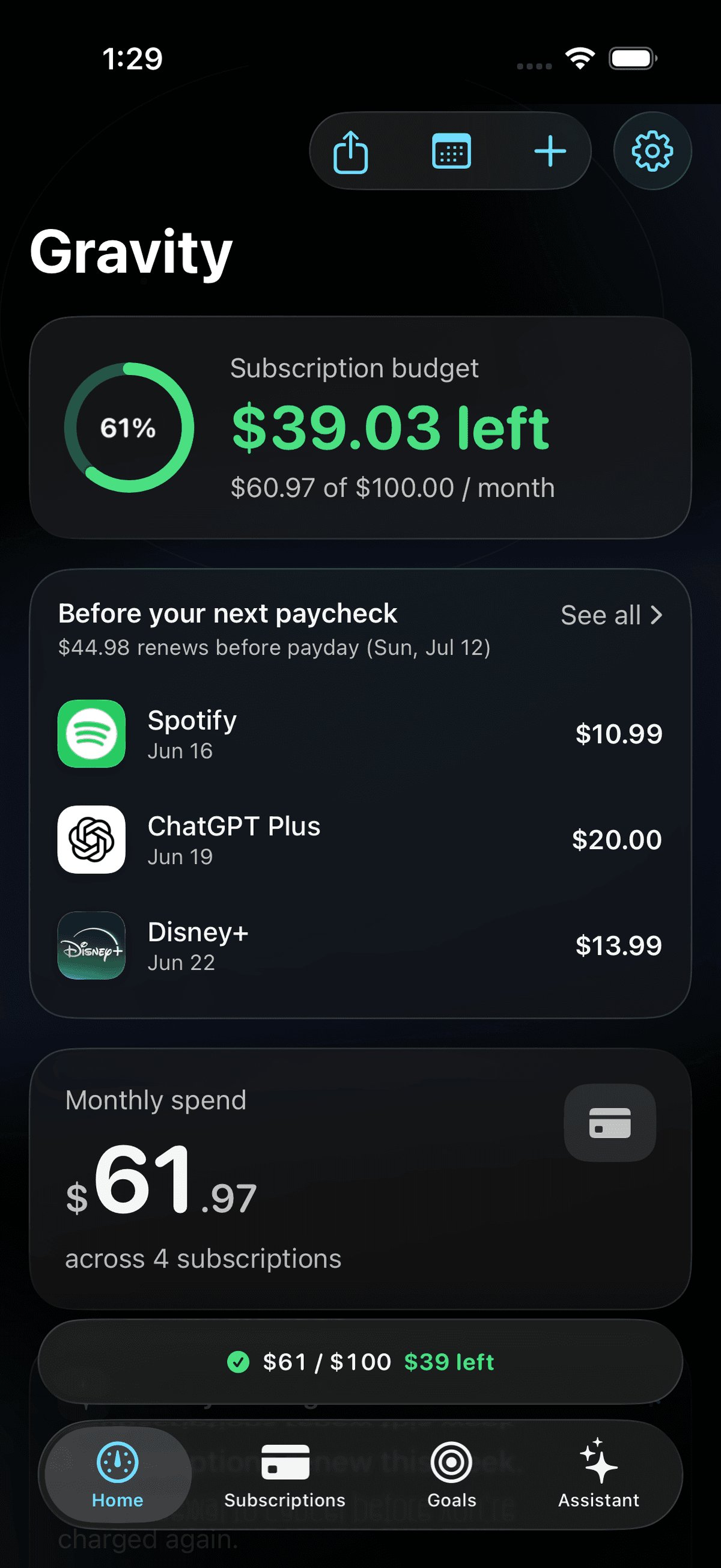
ONE PLACE FOR EVERYTHING YOU PAY FOR
FROM OVERWHELMED TO ON TOP OF IT
Know what's renewing.
Choose what's worth keeping.
Make room for what matters.
01 / GET THE FULL PICTURE
The streaming service. The gym. That app you tried once. Add your subscriptions and see exactly where your money goes, all in one place.
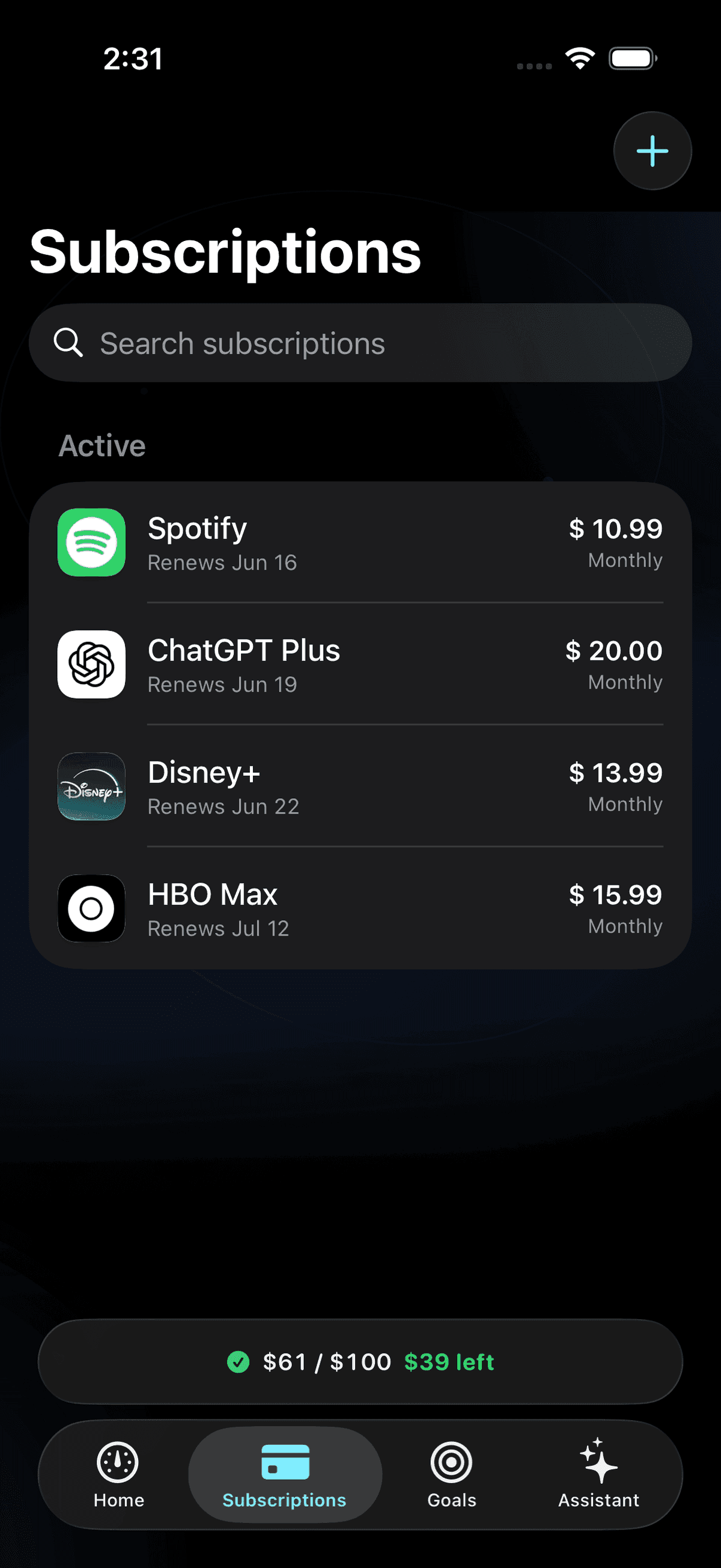 A look inside Gravity
SMALL HABITS. A LIGHTER MONTH.
Track free-trial end dates and get a reminder before a service starts charging.
Stay ahead of trialsPut the money you free up toward a savings goal. Give your progress a purpose.
The story behind GravityYour subscription data stays on your device. Add what you want to track, without handing over your financial logins.
A LITTLE LESS SUBSCRIPTION STRESS
“No joke I found a subscription charging me for months. Used this to cancel subscription before the next billing hit. Lowkey saved me.”
“I always forget free trials. This reminded me and helped me cancel subscription before I got charged. Huge win.”
“I have been leaking money on all these subscriptions and then after using this app, i feel much comfortable. No anxiety of unwanted payments for subscriptions which you never use.”
CHOOSING AN APP
Every app in this category is solving the same two problems: knowing what you actually pay for, and getting out of the things you no longer want. They disagree about how much access that should cost you. Here are the three approaches, and what each one asks of you.
Rocket Money, PocketGuard and Hiatus link bank and card accounts and detect recurring charges from your transaction history, so the list builds itself. On paid tiers some will contact a merchant to cancel on your behalf. The trade-off is account access, and the detection is only as good as how a charge is labelled on your statement.
Gravity sits here. You add the services you pay for, and it tracks renewal dates and free-trial deadlines, then gives you official-source cancellation steps for each one. You do the cancelling, which means there is no account connection to hand over and nothing to detect incorrectly. It is a paid app at $19.99/month or $59.99/year.
Settings > [your name] > Subscriptions on iPhone, and Play Store > Payments & subscriptions on Android, both cost nothing and cancel in a few taps. They have one blind spot: each shows only what that store bills. Anything charged straight to your card never appears there.
Most people end up needing more than the built-in lists because their subscriptions are split across Apple, Google and direct card billing. The honest question is not which app is best overall, but whether you would rather connect your accounts to have the list built for you, or keep that access and build it yourself. We compare the current options in detail, including the ones that are not ours, in our guide to apps that cancel subscriptions.
GOOD QUESTIONS
Still have something on your mind?
We're here to helpIt gives you one list of everything you pay for each month, warns you before a renewal or free trial charges, and shows you how to cancel each service. Apps differ in how they build that list: some link bank and card accounts to detect recurring charges, others have you add the subscriptions yourself.
They fall into two camps. Bank-linked apps such as Rocket Money connect to your accounts, detect recurring charges from your transaction history, and some will contact a merchant on your behalf on a paid plan. Private trackers such as Gravity never touch your accounts: you add what you pay for, and the app tracks renewals and walks you through the official cancellation steps, which you complete yourself.
Not for anything billed through Apple. Settings > [your name] > Subscriptions lists those and lets you cancel in a few taps, at no cost. An app earns its place when your subscriptions are spread across Apple, Google, and direct card billing, because the store lists only ever show their own share and the rest are invisible until the charge lands.
It depends on what the app asks for. Bank-linked apps route through providers like Plaid and need read access to your financial accounts, which is a real trade-off to weigh. An app that works from what you enter yourself never has that access, so there is no account connection to secure in the first place. Check what any app requires before installing it.
Four things: whether it requires a bank connection, which platforms it runs on, what it costs, and whether it actually helps you cancel or only lists what you pay. Many trackers stop at the list. Compare the current options on our subscription tracker comparison before you commit to one.
Gravity is a private subscription manager for iPhone. Add your subscriptions, see recurring costs, get renewal and free-trial reminders, and follow AI-powered cancellation guidance, all without connecting a bank account.
Gravity provides step-by-step cancellation guidance. It does not cancel subscriptions on your behalf. You complete the cancellation with the service or billing provider, such as Apple, and confirm it there.
No. Add subscriptions manually or import them from a screenshot or statement PDF processed on your device. Your subscription data stays on your iPhone, and no bank login is required.
Gravity is a paid subscription: $19.99/month or $59.99/year in USD. There is no free tier or free trial. Check the App Store for pricing in your region.
You can add any recurring subscription, including streaming services, music, software, fitness, news, games, and AI tools. Enter the name, amount, and renewal date to keep it in your list.
Gravity is available for iPhone and requires iOS 17.0 or later. You can download it from the App Store.
YOUR NEXT SMALL STEP

MAKE ROOM FOR WHAT MATTERS
Track your subscriptions. Rethink your renewals.
Take the next step with Gravity for iPhone.
$19.99/month or $59.99/year · Paid subscription
Scan with your iPhone
to view on the App Store.
Apple, the Apple logo, and iPhone are trademarks of Apple Inc., registered in the U.S. and other countries. App Store is a service mark of Apple Inc.